

For a year my workflow for editing a skill went like this. Change one line in SKILL.md.
Restart OpenCode. Watch every running session drop its connection. Wait. Test. Notice a
typo in the line I just changed. Restart again. I tweak skills and agents a lot, so a real
part of my day was a reconnecting spinner and me muttering at it.
OpenChamber 2.0.0 runs on OpenCode 2, and that loop is gone. I’ve been on it for two weeks and my hand still drifts toward the restart button out of habit, like reaching for a phone that’s already in your hand.
Everything reloads while you work
OpenCode 2 watches its own files. Save a skill, an agent, a command, opencode.json or
AGENTS.md, and it picks up the change within a few hundred milliseconds. A session that is
already running sees it on its next step. Add a skill in the middle of a long task and the
agent gets a note that a new skill is available. Nobody starts over.
That covers:
- skills, from
.opencode/skills,.claude/skills,.agents/skillsand your global folder - agents and commands written as markdown files
opencode.json: models, providers, permissions, MCP servers, plugins, web search- MCP servers, where OpenCode reconnects only the server you changed and leaves the others alone
- API keys you add in the app, and MCP sign-ins
- plugins, both npm packages and local files
The list of things that still need a restart is short. Environment variables, because a running process can’t see new ones. Switching the OpenCode binary. And a crash, which I’d also restart for.
OpenChamber used to restart OpenCode after almost every save in Settings. Now it does that for three reasons: you picked a different binary, OpenCode got updated, or the process died. Everything else just applies.
One thing to check after you update. OpenCode 2 reads project instructions from AGENTS.md
and doesn’t load CLAUDE.md at all. If your project rules live in CLAUDE.md, rename it or
point an AGENTS.md at it. Otherwise the agent works without your rules and is very polite
about it.
OpenCode is plugins all the way down
This is the part I got excited about. In OpenCode 2 a plugin can change almost anything the agent works with: agents, commands, skills, tools, models, providers, MCP servers, web search, references. OpenCode builds a lot of its own features the same way. The five web search providers are plugins. Skills are loaded by a plugin.
Two details matter most for us. Plugins reload on save like everything else, so writing one feels like editing a config file. And a plugin can register its own methods and events that a client can call over the API. So a plugin brings the logic, and OpenChamber can show it in the UI.
The routing experiment from the Auto mode post needed changes inside OpenChamber itself. The subagent version we’re building now is an OpenCode plugin. It sees every subagent launch and picks the model for it. If you’d rather route differently, you can write your own plugin and it plugs in the same way.
What we built on top
Once everything reloaded on its own, we went through the OpenCode 2 API route by route to see what else was in there. A few things were too good to leave for later.
The one I like most is Code Mode. Until now every tool the agent could use went into its context as a separate tool, with a description. Connect Linear, GitHub and a database, add a couple of plugins with their own tools, and the agent read a few dozen tool descriptions before you’d said hello. Then it called them one at a time. Fetch an issue, wait, read it, fetch the next one, wait. Watching it go through twenty issues felt like watching someone read a phone book out loud.
With Code Mode the agent gets one tool that runs a short script, and inside the script your MCP tools and the tools your plugins add are plain functions. “Go through my open issues, find the ones about the sidebar, give me their titles” becomes a loop the agent writes once. The script makes all the calls and only the final answer comes back into the conversation. Fewer tokens, fewer round trips, and you get the answer while your coffee is still hot.
The script runs in OpenCode’s own small interpreter, and the only thing it can touch is the tools you gave it. No network, no files, no processes. In the chat it shows up as a Script row, and if you open it you see the script and every call it made. Smaller models are worse at writing these scripts, so you can turn Code Mode off per MCP server in Settings.
Web search was already in OpenCode 2, with Exa, Firecrawl, Parallel, Tavily and TinyFish. In OpenChamber it looked like a pop quiz. The first search asked “which provider?” in a generic question card, and the results came back as a wall of markdown. Now the question has its own card, results show as small cards with the site, title and a snippet, and Settings has a Web search page for the provider and the keys.
The Plugins page used to judge a plugin by its config entry. If the entry looked right, the plugin looked fine, even if it had failed to load every single time since Tuesday. Now the page asks OpenCode what actually loaded and shows you the error when something didn’t. Plugins that aren’t pinned to a version can be updated from there too.
Skills got a small fix that matters a lot to me. Writing /skill in the middle of a message
used to add a polite note asking the model to maybe use that skill. Usually it did. Now the
skill is attached to the message, and OpenCode loads it every time.
And there’s a stats page, behind a bar-chart button at the bottom of the sidebar. Sessions, prompts, tokens, cost, a daily activity chart and a breakdown by model, for whatever range and project you pick.
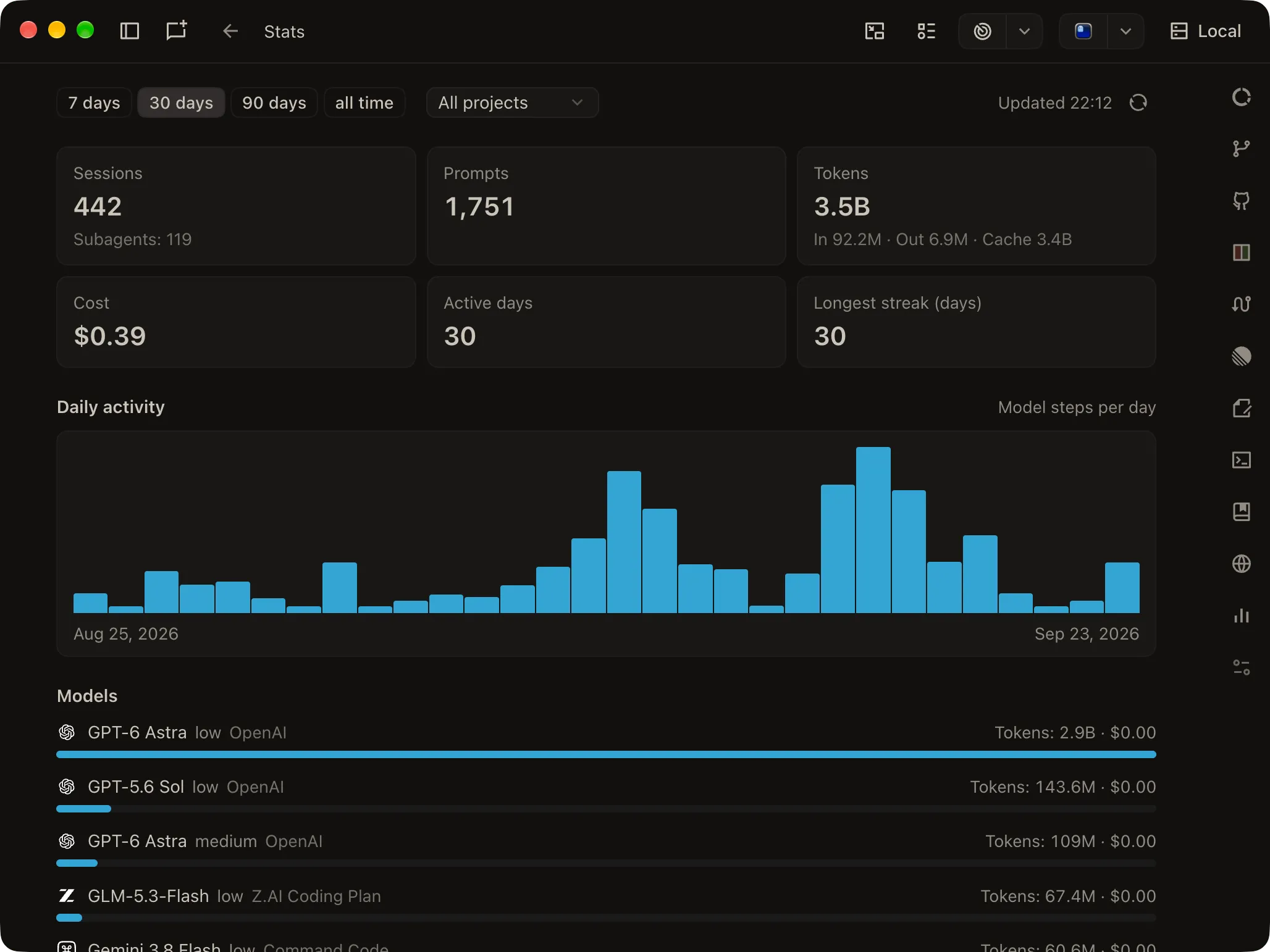
I opened it for the first time and learned two things about myself. I haven’t taken a day off in a month. And 3.5 billion tokens cost me $0.39, because almost all of it went through subscriptions, and the stats page only counts what the provider bills per token. I’ve decided both numbers are fine.
What’s coming next
OpenCode 2 has more in it than we could build for one release. These are next on our list:
- moving a session to another machine or instance and carrying on from where it stopped
- references: point the agent at another repo or docs folder with
@ - pinned instructions for a single session, like “this one uses pnpm”, that survive compaction
- sending a long-running command to the background so the agent can keep going
Beyond that, most new ideas now start with “can this be a plugin?”, and more often than not the answer is yes. We can ship faster that way, and things people build for OpenCode can show up in OpenChamber too.
Thank you, OpenCode team
The move to OpenCode 2 started with the OpenCode team reaching out and offering to help. For the two weeks of the migration we had a direct line to them. When something in v2 didn’t fit what OpenChamber needed, I could ask the people who wrote it, and the fix usually showed up in the next release. That made a migration of this size a lot calmer than it had any right to be.
Thank you. It was a pleasure working with you.
Updating
OpenChamber 2.0.0 needs OpenCode 2.0.15 or newer. The desktop app bundles it. If you run your own OpenCode, the app notices a 1.x install on startup and offers to update it. Your sessions from OpenCode 1.x come along.