

에이전트 기반 개발 환경.
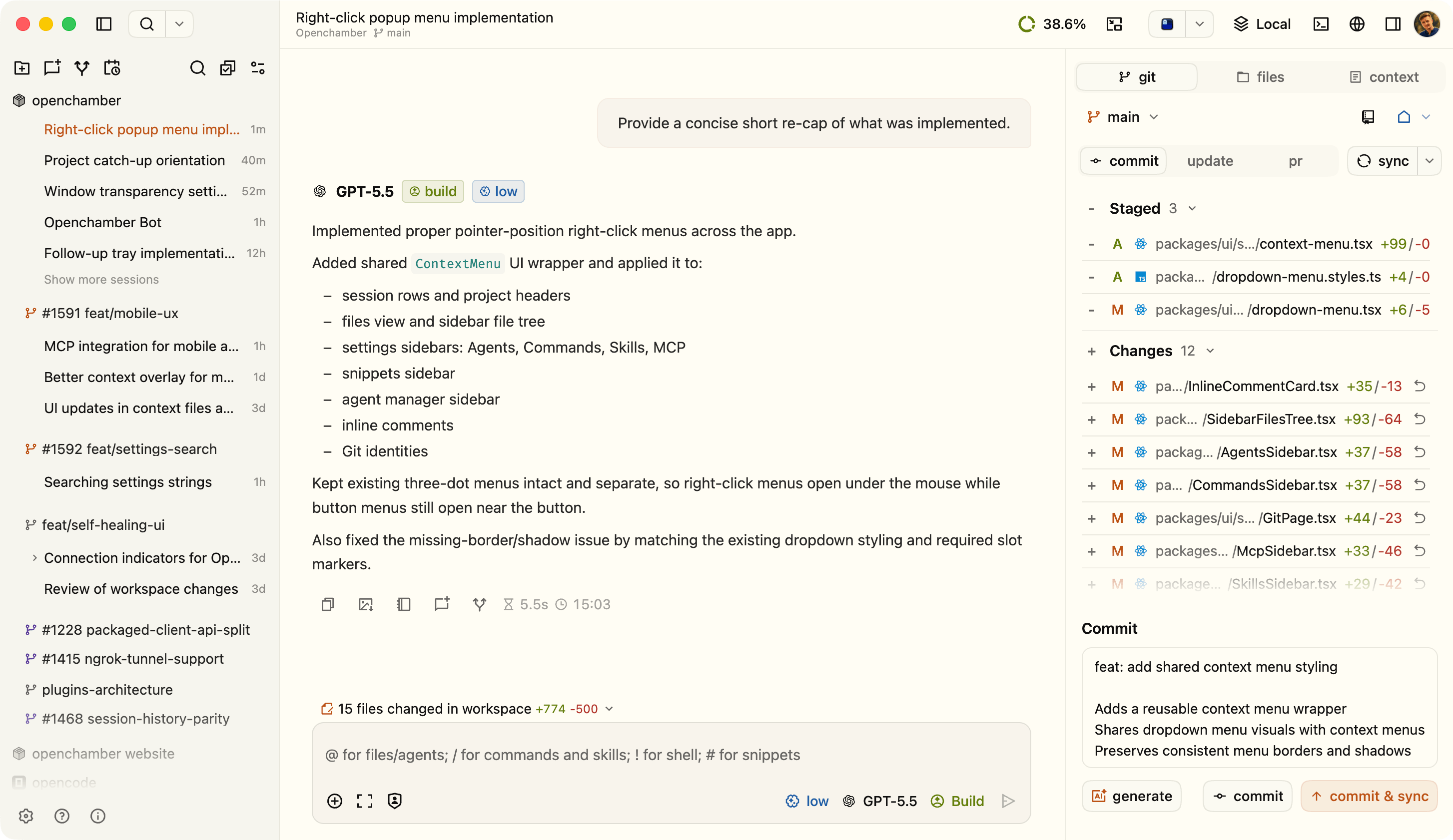
OpenChamber로 할 수 있는 일.
Session Goals
결승선을 정하면 에이전트가 턴을 거듭하며 그곳을 향해 계속 작업합니다. 앱을 닫아도 이어집니다.
Multi-run과 Fusion
같은 작업을 최대 다섯 개 모델에 맡기고, 가장 좋은 결과를 남기거나 뛰어난 부분들을 합칩니다.
Changes Walkthrough
큰 diff를 변경이 어떻게 맞물리는지 설명하는 순서대로의 단계로 묶어 줍니다.
Preview
실행 중인 앱의 요소를 가리키면 그 뒤에 있는 모든 정보를 에이전트에게 보냅니다.
issue에서 pull request까지
GitHub issue나 PR에서 시작해 실패한 체크를 되돌려 보내고, 앱을 벗어나지 않고 머지합니다.
예약 실행
cron 일정으로 프롬프트를 실행합니다. Session Goals와 함께 쓰면 결과를 향해 나아갑니다.


어디서나 펼쳐지는 작업 공간.
데스크톱, 브라우저, 휴대폰, VS Code 사이를 오가도 흐름을 놓치지 마세요.
데스크톱 앱
- macOS, Windows 및 Linux 앱
- 다중 창 프로젝트 워크플로
- Finder, Terminal, 에디터를 위한 「Open In」 단축 동작
- 개발 서버, SSH 포워딩, 로컬 URL을 위한 Project Actions
브라우저 / PWA / 모바일
- 어디서나 브라우저로 접근
- 휴대폰과 태블릿에 맞춘 컨트롤
- 네이티브 모바일 앱 (베타 공개 중)
- 브라우저 접근을 공개 사용에 적합하게 만드는 UI 비밀번호 게이트
- 백그라운드 알림과 탭 간 세션 활동
코드 에디터
- 에디터 네이티브 워크플로
- 도구 출력에서 파일을 바로 열기
- 선택 영역과 파일에 대한 우클릭 컨텍스트 동작
- 다중 모델 병렬 실행을 위한 Agent Manager

계속 만들어가는 이유.
부탁한 적 없는 글들, 매일 쓰는 사람들이 남긴.
 @Boripheus
 After years of switching between IDEs and TUIs, I found the sweet spot for everything I need: Openchamber.
 @logic
 Opencode + OhMyOpencode + Openchamber. This is some cooked stack. VSCode looks like legacy notepad++ now.
 @1un4rPunk
 Seriously, I've spent almost the whole week trying to find a tool that made sense to orchestrate agents and, as a dev (actually, a devops), openchamber is the only one that felt natural and logical.
 @AkakaFavour
 Best thing that has ever happened to me fr. I ship from anywhere: open code paired with openchamber + open design + agent browser.
 @friendorfi
 openchamber + opencode is a gamechanger, trust my words.
 @JohnRoyNL
 Switched to OpenCode and OpenChamber and never looked back. Wrote an MCP server for it to use it with Home Assistant Voice Assist for doing things on the go.
 hkay-dev
 I just want to say the app itself is phenomenal. The level of polish is just unreal. I saw OpenChamber back when it was a small project, I think maybe a couple months ago, and now it is unrecognizable. Truly amazing work. The latest release with its streaming feature is everything I could have possibly asked for and more. It is gorgeous and smooth.
 @drdanponders
 Stop using Openclaw for coding! Use OpenCode and OpenChamber instead!
 @realchendahuang
 I've had a deep experience with openchamber. I think my choice was right. This thing is really useful, smooth and silky.
 @PeaweeBoomhall
 alllll day, every day. I use OpenChamber as my UI for it. Amazing experience.
 @NihilSineTheo
 Was looking for a way to run agents from my phone, remotely on my server, other than tmux. Found OpenChamber. It is INSANELY good, highly recommended.
개인정보와 데이터
작업에 관한 어떤 것도 수집하거나 외부로 전송하지 않습니다. 코드와 세션 콘텐츠는 사용자의 머신에 그대로 남고, 작업 공간이 localhost를 벗어날 때는 원격 접근을 보호할 수 있습니다.
코드와 세션은 사용자에게 남습니다
OpenChamber는 프로젝트 이름, 경로, 프롬프트, 코드, diff, 세션 콘텐츠를 수집하지 않습니다.
원격 접근은 보호됩니다
브라우저 접근은 UI 비밀번호로 제한할 수 있고, 터널 링크는 더 이상 동작하지 않아야 할 때 교체하거나 폐기할 수 있습니다.
개인정보 보호는 검증 가능합니다
OpenChamber는 오픈 소스이므로, 개인정보 보호 모델이 약관 문구 뒤에 숨지 않고 코드에 그대로 드러납니다.
Private Relay, 열린 포트 없이
일회용 QR 코드로 기기를 페어링하고, 포트를 열거나 공개 서버를 노출하지 않고 Private Relay로 연결합니다. 연결은 종단 간 암호화되며 언제든 해지할 수 있습니다.
OpenChamber 자주 묻는 질문
curl -fsSL https://opencode.ai/install | bash 명령으로 설치하세요.더 궁금한 점이 있나요? 문서를 확인하세요